Posts

Deploy custom SPFx webpart

gulp clean gulp build gulp bundle --ship gulp package-solution --ship \temp\deploy Upload all files to CDN path (as in write-manifest.json) \sharepoint\soultion Upload sppkg file to AppCatalog. Check in. Go to site contents. Add the app. Add webpart to page.

Common UI interactions with jQuery

In this post, I am listing some of the commonly used UI interactions when working with jQuery. Button click on pressing Enter over a text box $(document).ready(function(){ $("#btnSearch").click(function(){ $(".alert").show(); }); $("#txtName").keypress(function (e) {         var key = e.which;         if (key == 13)  // the enter key code         {             $("#btnSearch").click();             return false;         }     }); });

CRUD on SharePoint list item using JQuery Deferred promise

Add new list item. After new list item added, read all list items. This demonstrates JavaScript promise in SharePoint context. What is a Promise? A promise is an object that may produce a single value some time in the future: either a resolved value, or a reason that it’s not resolved (e.g., a network error occurred). A promise may be in one of 3 possible states: fulfilled, rejected, or pending. Promise users can attach callbacks to handle the fulfilled value or the reason for rejection. Learn more... var deferred = $.Deferred(); var siteUrl = _spPageContextInfo.webAbsoluteUrl; var listName = "SPFx"; $(function(){        bindButtonClick(); }); function bindButtonClick(){     $('#btnSubmit').on('click', function(){         addListItem().then(function(data){             getListData();         });     }); } var addListItem = function(){     va...

Best Practices: jQuery for SharePoint development

Rule 1 Set jQuery in no conflict state This requires you to use jQuery instead of $ For example, write jQuery("elementId").text("hello"); instead of $("elementId").text("hello"); Rule 2 Use SharePoint's _spBodyOnLoadFunctionNames array instead of jQuery’s document ready function SharePoint uses its own body onload function called _spBodyOnLoadFunctionNames which will collide with your document ready (run before or after).  If you are loading your JavaScript files through the elements.xml file (through a feature in Visual Studio), this can be particularly problematic with the order of how things load. Instead, create a function with a custom name, and push the custom name into the _spBodyOnLoadFunctionNames array.  It’s wonderful and allows things to load in their proper order. For example, write _spBodyOnLoadFunctionNames.push("myCustomFunctionName"); function myCustomFunctionName() {      // My custom funct...

SharePoint List Custom Form Shows HTML as Text on Lookup Fields

Image
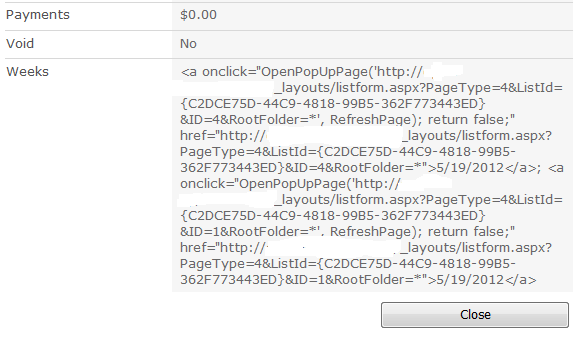
Display forms on SharePoint by default display a link on lookup columns. This allows us to click on the link and edit the record from another list. When creating a custom display form on SharePoint Designer, the form displays the actual HTML instead of rendering the HTML on the lookup columns. For example, see this image: The form displays text instead of the actual anchor tag. This is because the default output for the XSL transformation is to escape special characters. To address this, we need to modify the XSL template and force the output to render the HTML instead of displaying it as text. This can be done by adding the disable-output-escaping attribute to the xsl:value-of tag. Open the code view of your form and look for the template that handles the rendering of the fields. Look for the field that has the problem and add the attribute. This is what the tag should look before and after the change: Before After <xsl:value-of select="@FieldName" /> <xsl:v...

CRUD operations on SharePoint list using AngularJS

Image
In this post, I am going to share some code snippets for performing CRUD operation on a SharePoint list using only client side script written with AngularJS. It is a simple implementation, where I am going to create a web part, which will have reference to a controller that will read, create, update and delete list items. I hope you are reading this post with some prior experience with SharePoint and AngularJS. The environment I am working upon is a SharePoint Online (Office 365) site. I have created a Contacts list as in the below screenshot. For this example, I will be using only 3 fields/columns in the list. ID (Auto generated for every item in the list) Last Name (Internal name: Title) First Name (Internal name: FirstName) Create the webpart I have added one Content Editor Webpart to a page and linked it to our view page [listItems.html]. The view page has 4 sections to view contacts, add, edit and delete them. For each of these opera...

Blessed with 1080p 60fps gaming rig

Image
Honestly, nothing beats the satisfaction playing your favorite games, on a new rig, at 1080p 60fps. The 1080p resolution is pretty standard in 2015, and has been sticking around for some time now. But the power and efficiency of new GPUs has increased exponentially. Now a days anyone can get a great gaming experience without breaking the bank. I bought my first PC back in 2005, mostly built using cheap parts available in market. I was in college and budget was really an issue, especially in India, where you actually buy a PC to learn "coding" :P It was not much, but did the job. Used to become hot like hell. Could dry my cloths during rainy days. Had two hard drives, both of them failed after 2 years of use, due to a bad power supply unit. Later on I got a job, and I was moving from place to place, decided that a laptop will suffice my gaming crave. Spent 40K INR (~$600) on an Acer Aspire 5738G, with Core 2 Duo processor, 4GB memory and ATI Radeon 4570HD graphics car...
The all new Movie Central

Image
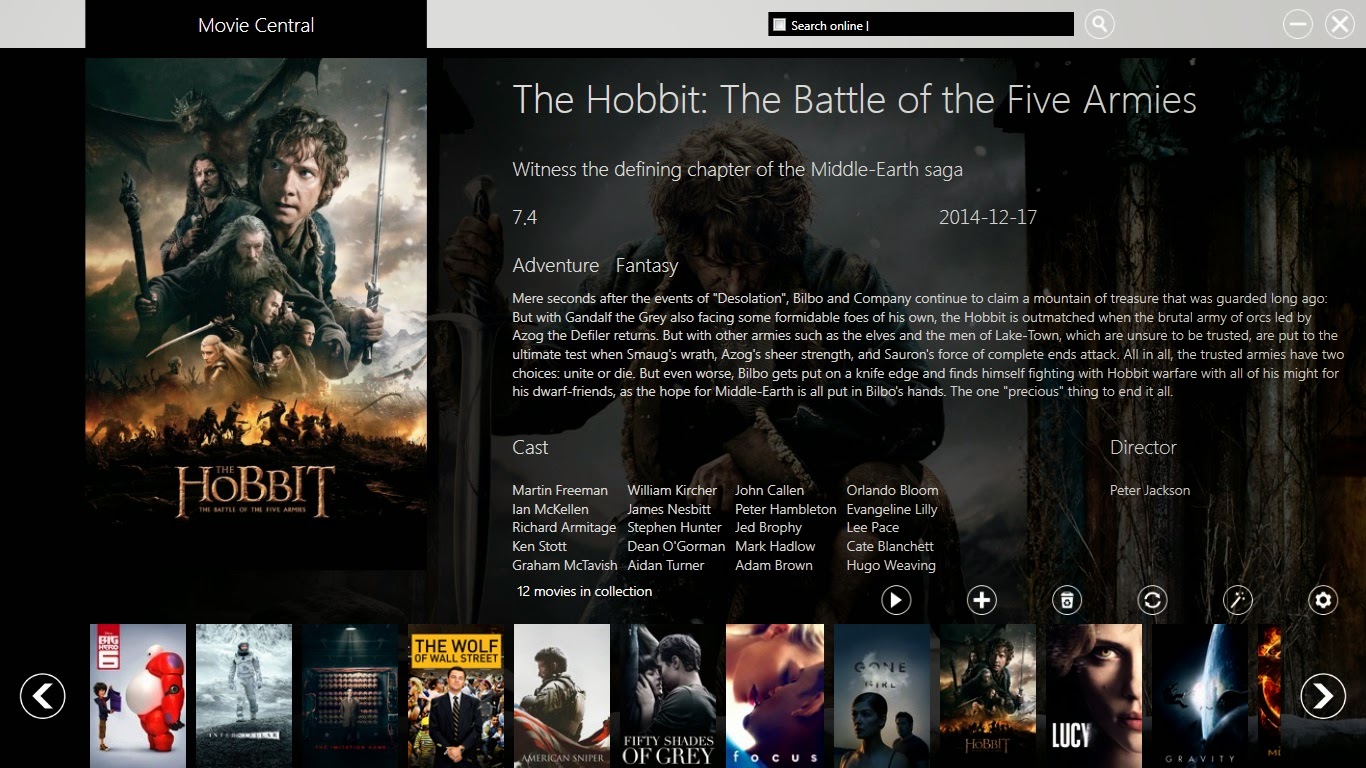
Movie Central A free desktop personal movie collection manager Hi folks, After a long time, I am glad to release the all new Movie Central desktop app for Windows. All new fresh look, a new experience. The most fun way to manage your personal movie collection. Automatically scan your PC folders for movies, and add them to your collection. Movies can be played from the app itself. Guided Tour   Download links Project website https://sourceforge.net/projects/moviecentral/ Contact me sidtechster@gmail.com https://twitter.com/@sidtechster https://www.facebook.com/MovieCentral2015

New Movie Central app in development....right now !!!

Image
Hello Folks, After pretty long gap, I have started on development of a new version of Movie Central app. Here is a screenshot, nightly build. And it will be kick-ass.

Set perfect wallpapers for Nexus 7

Image
I have a Google Nexus 7 2013 version. It's a hands down great device with a great display. I also love to change the wallpaper on the home screen regularly. Problem is I wasn't able to figure out the perfect wallpaper resolution for the device. I used 1080p photos but at the lock screen, a bit of the screen space is left out, which was annoying for me. So I found a simple solution. Rotate the device in landscape mode and then set the wallpaper from the "Settings" menu as you would normally do. Go back and lock the screen now and rotate it to portrait mode. The wallpaper should take up whole screen space.

PowerShell script to check user in Active Directory

Image
 Here is a quick PowerShell script to check for user in present in Active Directory. $user = "JohnDoe" $searcher =  [ADSISearcher]"(sAMAccountName=$user)" $results =  $Searcher.FindOne() If ($results -eq $Null)      {"User does not exists"} Else      {"User Exists"} Same can be done using the user email $email = "JohnDoe@company.com " $searcher =  [ADSISearcher]"(mail=$email)" $results =  $Searcher.FindOne() If ($results -eq $Null)      {"User does not exists"} Else      {"User Exists"} It can be extended more to retrieve more information on the user. For example if the user account is active in AD. $email = "JohnDoe@company.com" $searcher =  [ADSISearcher]"(&(mail=$email)(userAccountControl:1.2.840.113556.1.4.803:=2))" $results =  $searcher.FindOne() If ($results -eq $Null)      {"User account is enabled"} Else  ...

SharePoint - Basic concepts about SharePoint Farms

Image
People often have different ways of describing what exactly a SharePoint farm is. There are different ways of describing the Application server and the Web-Front End (WFE) server. As a developer, it is very important to understand the basics concept of the term 'farm' because when a solution is developed, it will be eventually be deployed in the servers present in the 'farm'. What is a farm? In the context of SharePoint, the term 'farm' is used to describe a collection of one or more SharePoint servers and one or more SQL servers that come together to provide a set of basic SharePoint services bound together by a single Configuration Database in SQL. Farms can range in size from having everything (all SharePoint roles and SQL server) on one machine to scaling out every individual SharePoint serve role onto dedicated sets of servers. A farm the highest administrative boundary for SharePoint and everything that happens inside SharePoint happens in ...

Panasonic TH-39B60D Review

Image
Panasonic 39B60D Great Value for Money Full HD TV. Stellar picture quality. Good sound quality, not special. IPS panel, great view angles. No loss of color when viewed from extreme angles. Full LED backlit panel. Deep blacks, great contrast. Very good noise reduction, SD picture reproduction is really good. Good remote controller, fits in hand nicely. Video format support by in-built player limited. Issues with playing MKV files. Can access only FAT32 formatted, HDD / Thumb drive. No 3.5mm audio output. RCA audio out only. Media player plays video in preset aspect ratio, and not in the original ratio of the content. Basically, avoid playing anything with the media player. I will recommend to have a separate media player such as a Blu-ray player / a game console. A true value for money, non-smart LCD TV. 4 out of 5

SharePoint - Logging to ULS in SharePoint 2010

Image
 When developing custom components for SharePoint, be it simple or complex, it is a good practice to log all the activities made by the solution. It is of great help during debugging and maintaining the code. SharePoint 2010, via its object model, let's us access the diagnostic services and add custom messages to the log files. Here is a quick example. In this case we are trying to access a list named MyList, which does not exists in the site. So an exception will be thrown. using (SPSite site = new SPSite("http://site/")) { using (SPWeb web = site.OpenWeb()) { try { SPList list = web.Lists["MyList"]; } catch (Exception ex) { SPDiagnosticsService.Local.WriteTrace(0, new SPDiagnosticsCategory("My Category", TraceSeverity.Unexpected, EventSeverity.Error), TraceSeverity.Unexpected, ex.Message, ex.StackTrace); } } } And here is what we get i...

SharePoint - How to Create Hyperlinks to a Pop-Up Dialog

Image
Do you like those cool SharePoint 2010 shadowbox pop-up dialogs? So do I, since it means less page navigation and general confusion for end-users. The problem is when you want to create your own custom hyperlinks from quick launch or throughout your own pages. There are several blogs out there that show how to accomplish this using JavaScript snippets in CEWPs, etc. But there is actually a much easier way to do it using a built-in JavaScript feature of SharePoint. Use this in your HTML <a href="javascript:OpenPopUpPage('http://bing.com');">Test Link</a>  Note: Obviously, replace the Bing URL with your own.

SharePoint - Register a new managed account

Image
 I was getting an error while I was trying to add a new managed account. An error occurred while getting information about the user username at server servername: The system detected a possible attempt to compromise security. Please ensure that you can contact the server that authenticated you. Solution: If you are trying to add a new managed account using a local account, you can perform this task via PowerShell. Right click on SharePoint 2010 Management Shell > Run as Administrator In the PowerShell window - type: $cred = Get-Credential You will be prompted to enter an account and password (here you can type in a local account) Back in the PowerShell window - type: New-SPManagedAccount -Credential $cred Even though the warning appears, the account is added.

Gran Turismo 5: Spec 2.0 review

Image
It's a great thing that I bought a brand new PS3 Slim. And the first disc that I popped in was definitely GT5. What a game, rather, it's more than that. Once you have a look at it, it is quite hard to take your eyes off. When GT5 was launched, it was an unpolished and unfinished game. As of now, Polyphony Digital has worked hard to plug those gaping hole that stopped GT5 from being the crown jewel of sim racing across any console. After 2.0 update, it's not 100% perfect, but still after about 1.5 GB patch update (v 2.05), one should expect some real fix across the game. First thing that is noticeable, is the loading time. Its quite fast. I didn't spent much time on staring at the GT logo on a black screen. Rather the loading screen is just for loading the track. After that you get a menu to start the race, that's when the cars are loaded, one after another. But the loading speed here is acceptable. I don't blame it on the game though, I t...

Service Codes for Android

Image
1. Complete Information About your Phone *#*#4636#*#* This code can be used to get some interesting information about your phone and battery. It shows following 4 menus on screen: • Phone information • Battery information • Battery history • Usage statistics ----------------------------------------------------------------------------------------- 2. Factory data reset *#*#7780#*#* This code can be used for a factory data reset. It’ll remove following things: • Google account settings stored in your phone • System and application data and settings • Downloaded applications It’ll NOT remove: • Current system software and bundled application • SD card files e.g. photos, music files, etc. Note: Once you give this code, you get a prompt screen asking you to click on “Reset phone” button. So you get a chance to cancel your operation. ----------------------------------------------------------------------------------------- 3. Format Android Phone *2767...